

How To Create New Admin User In Magento 2

How to Create New Admin User in Magento 2
How to, Magento 2 301
Magento is one of the most usedeCommerce platforms. Which are given much attention to online businesses such as marketing activities, order management, content management, inventory, and many other essential aspects.
Magento 2 creates the role of administrator with full permissions by default. However, many stores in Magento also have users who do not have permission to access each section in the admin panel. Doing this helps prevent accidental configuration messes occurring in your store. That is why you can create an admin account for every member of your team, who can make the management of the store even more easy and effective.
Here you will learn 2 ways to create new admin user, first through the admin panel and second with the command line.
First Way To Create New User Using Admin Panel:
follow the below steps to create new admin user in Magento 2:
- Step 1: Configure User Information
- Step 2: Determine Admin User Role
- Step 3: Check result
- Create admin account via command line
Step 1: Configure User Information
- On the Admin panel, click System. In the Permissions section, select All Users.
- In the upper-right corner, click Add New User button
- In the Account Information section, do the following:
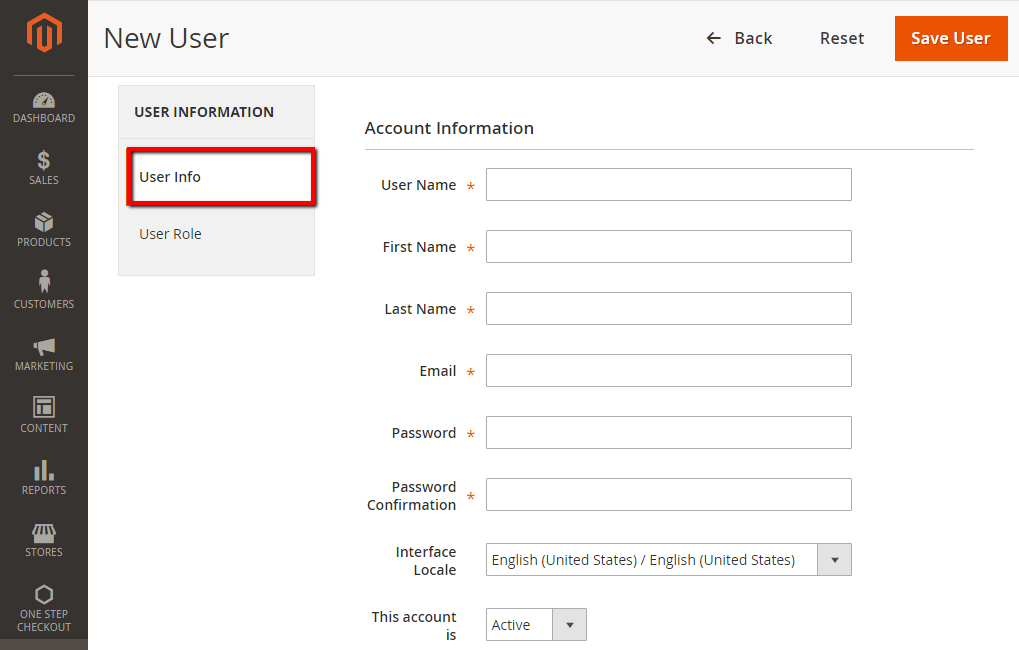
- In the User Name field, enter the user name for the account. It is not case-sensitive.
- Complete the following information:
- First Name
- Last Name
- Email address: This email address must be unique.
- In the Password and Password Confirmation field, enter correctly the password, the password should be secured, should contain more than seven characters, and should include both letters and numbers.
- In the Interface Locale field, select the language to be used for the Admin interface if your store has multiple languages.
- In the This Account is a field, set to Active
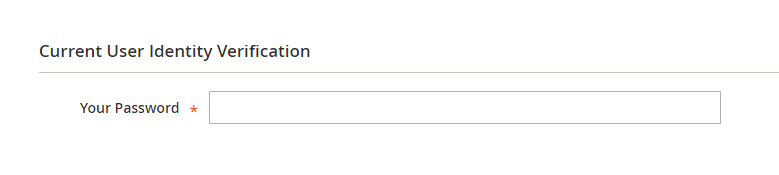
- In the Current User Identity Verification section, enter your password in Your Password.
Step 2: User Role:
- In the panel on the left, choose
User Role. The grid lists all the existing roles. Initially, the only role available is Administrators.
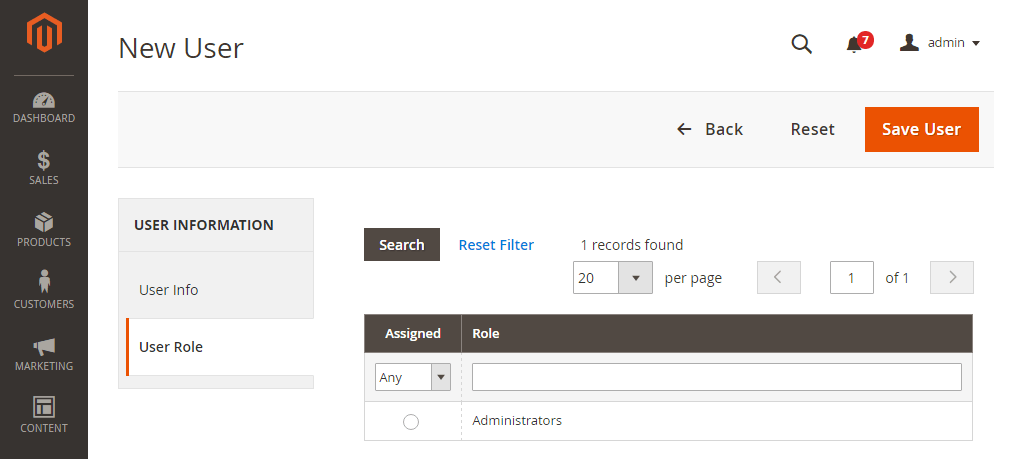
- In the
Assignedcolumn, select theAdministratorsoption. - When complete, click
Save User.
Step 3: Check result:
- Flush cache and check your result.
Second Way To Create New User Using Command Line:
- Go to Magento 2 root folder, run create new admin user command line:
- Run this command given below:
| php bin / magento admin : user : create -- admin - user = username -- admin - password = userpassword -- admin - email = example @ gmail . com -- admin - firstname = user -- admin - lastname = webiators |
- Flush cache and check your result.
We hope this post helps you to easily create Magento 2 new admin user in the Magento store, but if you have any problems related to the Magento 2 upgrade, you can contact us anytime. Our Magento developers are ready to assist you at all times.
Thank You;-)
Hit 5 Stars if you find this post helpful
People also searched for

Magento developer at Webiators with enhanced skills so that she can render multi-faceted stores for our clients.
How To Create New Admin User In Magento 2
Source: https://webiators.com/create-new-admin-user-in-magento-2/
Posted by: moorelilly1969.blogspot.com
0 Response to "How To Create New Admin User In Magento 2"
Post a Comment